Orik — the AI assistant that knows your car
Orik is Autoracle’s character and your car assistant: he recognises documents, reminds you of deadlines and answers questions in the chat based on the records of your particular car. He never records anything on his own, doesn’t diagnose in place of a mechanic and searches the web only when you’ve turned search on.
 12 September, at 84,200 km — 7,400 km ago. Next change at 99,000 km.3 sources
- Orik answers from your car’s data: workshop visits, jobs and parts, spending, fuel consumption, mileage, condition of parts, reminders, documents and the service schedule.
- The chat is read-only: Orik doesn’t record or change anything, but tells you where to do it in the app.
- A message to Orik costs 1 Orik Pro credit; web search is turned on with a switch and costs 2 more credits, and the answer comes with sources.
- About faults Orik only gives “likely causes” and always adds that only a mechanic can make an exact diagnosis at an inspection.
- The pre-trip checklist is built for free and without AI; “Orik’s comment” on it costs 2 credits.
- The “Orik noticed” card on the dashboard is free and calculated without AI: fuel price, spending above normal, refuelling rhythm, large expenses.
- Each person has their own conversations: only you can see yours; conversations can be searched, renamed and deleted.
Who is Orik
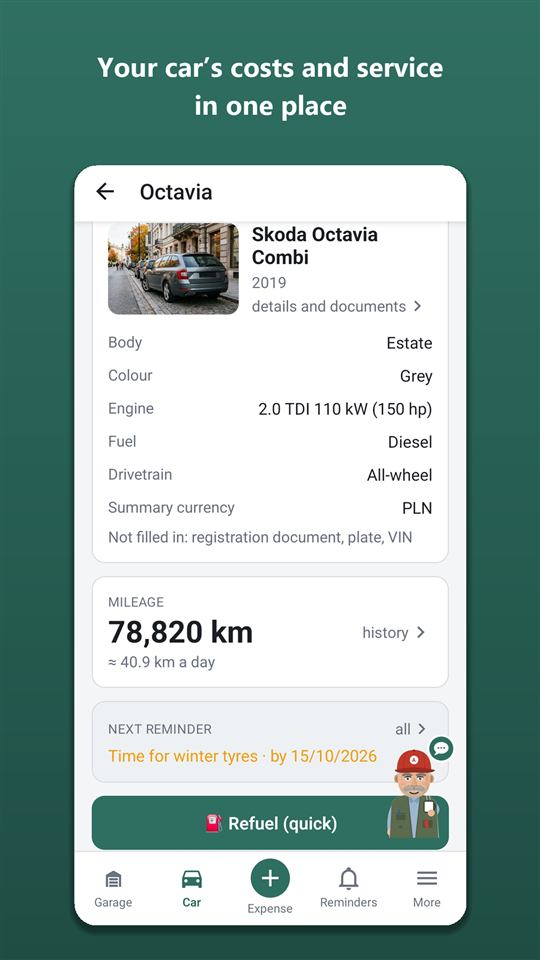
Orik (full name Autorik) is Autoracle’s mascot: a jack-of-all-trades from a good garage, fifty-something, in a cap and a slightly oily waistcoat. Wry, seen-it-all and never panicking. He lives in the bottom-right corner of the dashboard, blinks, opens the chat when tapped and turns up all over the app: when you first meet, in confirmations, in push notifications about deadlines, in tips.
Orik addresses you the way you choose when you first meet or in Settings: “boss”, or neutrally — “my friend”. He talks to you informally and in all 13 of the app’s languages — his lines aren’t translated word for word but written for each language.
Cars are my thing. Ask me when the oil was changed or how much goes on fuel — I’ll check the records and tell you.
He delivers bad news calmly and to the point: an overdue item isn’t a tragedy, it’s a reason to get on with it. But on anything dangerous he keeps it short — more on that below.
Chatting about your car: what you can ask
The chat with Orik is for questions about your car, which he answers from its records rather than “in general”. Before answering, Orik gets a summary of the car (details, mileage and how much you drive, condition, tyres, reminders, documents, service plan, recent visits, spending by category, consumption from full tanks) and, if needed, looks into the expense list, visits with jobs and parts, inspection history and trips himself.
Example questions:
- “When did I last change the brake fluid, and at what mileage?”
- “How much did I spend on fuel this year, and how does that compare with last year?”
- “Which of the mechanic’s recommendations haven’t I done yet?”
- “What did the last inspection say about the pads?”
Orik converts spending into the car’s currency at the rate on the date of each record — just like the statistics, not “from memory”. An empty chat has ready-made questions: a tap puts the text into the input field, where you can edit it and send it.
Orik only reads. Ask him to log a refuel and he’ll explain where to do it, but nothing gets into the car’s data without you. He talks only about cars and the road; to an unrelated question he’ll politely steer the conversation back to the car.
Searching the web for part prices and reviews
Orik searches the web only if you’ve turned on the “Web search” switch by the input field. That way you know in advance the message costs more: 1 credit for the message and 2 more for the search — up to 3 credits. After sending, the switch turns itself off.
When it’s useful:
- part prices — the answer is a range, with sources and a date;
- reviews of a part or a workshop;
- recalls for your model.
The search takes your country into account, so it finds local shops and prices. Links to the sources are shown under the answer — you can check them yourself. Without search Orik answers from his own knowledge and suggests turning search on if the question needs it.
How much will the next service cost: an estimate from your history
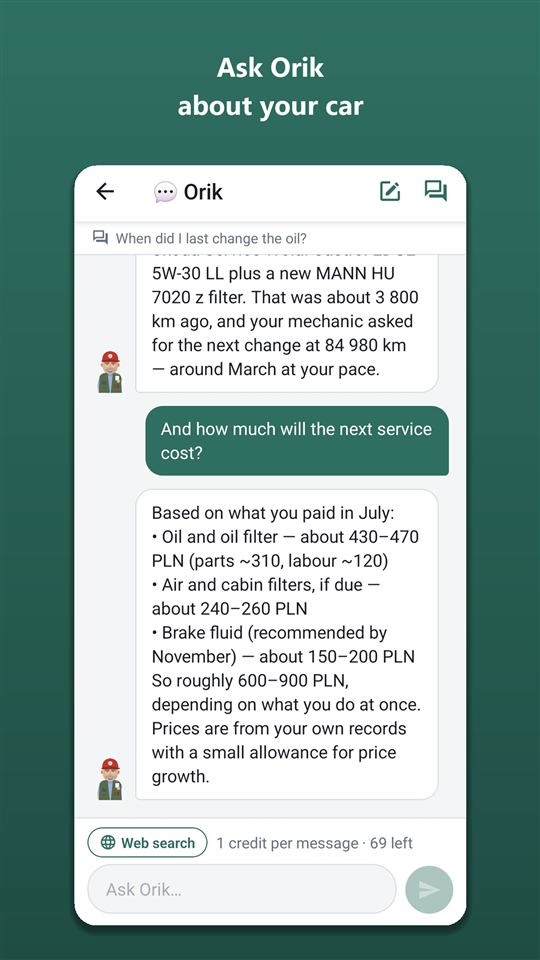
Ask “How much will the next service cost?” and Orik puts together an estimate from your car’s history: he takes the jobs of the next service from the plan and the past prices for the same jobs and parts, adjusts for time and gives a range and a total. Labour and parts — separately.
He says plainly what comes from your records and what is an estimate. If, for example, you changed the spark plugs once three years ago, that price is marked as approximate.
The estimate is based on the car’s service plan — more about it on the service schedule and reminders page. The fuller the service book, the more accurate the answer; work orders are easy to add from a photo.
A knock, a leak, a warning light: how Orik deals with faults
About faults Orik only gives likely causes — starting with the most likely — and always ends by saying that only a mechanic can make an exact diagnosis with the car up on a lift. He takes the car’s history into account: what was recently replaced, the mileage, what the last inspection showed.
Brakes, steering and tyres — straight to a mechanic. And if it’s a bodge job or putting off a dangerous repair — wire instead of a hose clamp, pads worn down to the metal, bald tyres, driving with the oil pressure or overheating light on, a fuel leak — Orik turns into a stern older friend: short, firm, no jokes. Fix it now, or don’t drive and call a tow truck.
This isn’t a case of “I’ll drive on it for another week”. Brakes — today, to a mechanic.
Orik doesn’t blame the mechanic who services your car: he sees the records, but he can’t see the car.
Pre-trip checklist and “Orik’s comment”
The pre-trip checklist is built for free and without AI from the car’s data: pad and disc wear, tread depth and tyre season for the trip dates, radiator, reminders that fall due before the end of the trip given its kilometres, insurance and inspection validity, route countries, rest stops on a long drive, what to take with you. It works without Orik Pro and offline; the route and dates are filled in from the trip calculator.
“Orik’s comment” is an addition to this list in Orik Pro for 2 credits. Orik looks at the list together with the car’s history and writes what matters for this particular trip: the 2–4 most important points, what’s missing for this model, advice on the route and season. The comment is saved on the phone; if you change the dates or route, it can be updated.
You can also ask about a trip in the chat — Orik replies with a list: “Do before the trip / Check / Take with you”.
“Orik noticed”: dashboard tips without AI
The “Orik noticed” card on the dashboard shows up to three short observations from your records. They’re calculated right in the app, without AI, so they’re free and use no credits.
- Fuel price — a unit of fuel this month is cheaper or dearer than last month (from 3%).
- Spending above normal — spending over 30 days against your usual (from 20%).
- Refuelling rhythm — “you fill up every ~17 days / ~770 km”.
- The biggest expense over 30 days, excluding fuel.
- Fuel station brands — if you pay noticeably more or less at one brand than at your others, for the same fuel in the same weeks and including discounts.
- Tyre age by the DOT date, if it’s time to have them checked.
More on how consumption and the cost per kilometre are calculated — on the cost per kilometre and statistics page.
Tips for newcomers
Instead of a long tour on first launch, Orik gives a tip at the moment you reach the place yourself: in an empty garage — how to add a car from the registration document, on your first dashboard — where to log a refuel, on the “+” screen — what kinds of records there are, in the “More” sheet — what’s where.
Each tip is shown once. “Got it” closes it, and “Don’t show tips again” turns them all off at once.
Step by step in the help guide
Conversations, price and chat privacy
Chats with Orik are organised into conversations. A new conversation — the icon in the chat header; Orik doesn’t drag the old conversation into it, which also makes it cheaper. The list of conversations is grouped: today, yesterday, this week, earlier. You can search by title and by message text, and rename or delete a conversation.
Price. The chat is an Orik Pro feature: 1 credit per message, plus 2 more with web search. The subscription includes 30 credits a month (€4.99 per month or €29.99 per year; in Poland 18.99 / 119.99 zł), and the trial gives 3 days of Pro and 10 credits. Your remaining credits are shown above the input field. If Orik fails to answer, the credit is refunded.
Privacy. Each person has their own conversations: in a shared car, members can’t see yours, and Orik can’t see other people’s private records. Conversations are kept until you delete them, are deleted with the car or the account, and are included in “Download my data”.
Where it’s unavailable. In countries where AI doesn’t work (Belarus, Russia and others), the chat and recognition are switched off; this is determined by where you connect from, not by the car’s country. The rest of Orik Pro is free there. The chat works only online.
Frequently asked questions: Orik — the AI assistant that knows your car
How much does the chat with Orik cost?
1 Orik Pro credit per message and 2 more if web search is on. The subscription includes 30 credits a month, and there are credit packs. “Orik noticed”, tips and the pre-trip checklist are free.
Can Orik log a refuel or a visit himself?
No. The chat only reads the car’s data. Orik tells you where and how to log it, and you save it yourself.
Does Orik make a diagnosis?
No. He names likely causes, taking the car’s history into account, and always reminds you that only a mechanic can make an exact diagnosis at an inspection. Brakes, steering and tyres — straight to a mechanic.
Where does Orik get part prices from?
From the web — only if you’ve turned on the “Web search” switch. The answer is a range, with sources and a date. Without search Orik answers from his own knowledge and your past prices.
Can other members of the car see my conversations?
No. Each person has their own conversations. You can delete them at any time, and a copy is included in “Download my data”.
Does the chat work offline?
No, answering needs the internet. Offline, manual tracking, the safe, loyalty cards and the pre-trip checklist (from saved data) still work.
Does Orik work in Belarus?
The chat and photo recognition aren’t available there — it’s a restriction of the AI provider, determined by where you connect from. Tracking, statistics, reminders and the other Orik Pro features that don’t use AI work for free.
Scan fuel receipts, work orders and car documents from a photo
With Autoracle you don’t retype receipts: photograph a fuel receipt, a workshop work order, an insurance policy or a registration document, and Orik, the AI assistant, puts the data into the form fields.
Learn moreService schedule and car maintenance reminders
Autoracle remembers for you when to change the oil, the timing belt and the brake fluid, when the insurance runs out and when it’s time to change tyres.
Learn moreRoad trip cost calculator for driving in Europe
The Autoracle calculator plans the route by road, sees which countries it crosses and works out fuel at each country’s price, toll roads, vignettes and ferries.
Learn moreTry it with your own car
All tracking is free forever. Photo recognition and Orik the assistant — 3 days of Pro free after sign-up.