Service schedule and car maintenance reminders
Autoracle remembers for you when to change the oil, the timing belt and the brake fluid, when the insurance runs out and when it’s time to change tyres. The service schedule comes from your service booklet, a ready-made catalogue or a web search, and reminders arrive as push notifications every day until the job is done.
- You can get a service schedule free from the shared catalogue, enter it by hand or — in Orik Pro — recognise it from your own service booklet (15 credits) or find it on the web (10 credits).
- Each schedule item has two intervals — for normal and for severe operating conditions (short trips, city traffic, dust, taxi work, hard frost).
- The mandatory service items depend on fuel and drivetrain: glow plugs and the particulate filter for a diesel, transfer case and differential oil for four-wheel drive, battery cooling and reduction gear oil for an electric car.
- The schedule produces a service plan and one reminder for the next service; a visit marked “Scheduled service” closes it and sets the next one.
- For mileage-based reminders the app works out the expected date from how many kilometres you drive per day.
- Reminders arrive as push notifications every day at the hour you choose until you tap “Done”, snooze them or turn them off.
- Tyre change reminders take into account the 16-day weather forecast for the car’s region and the country’s winter tyre laws.
How to get the service schedule for your car
Open “More” → “Service schedule” and tap “Find the schedule”. There are four ways — two free and two in Orik Pro.
- Ready-made from the catalogue — free. If the owner of the same car has already uploaded their service booklet, Orik offers its schedule. Make, model, engine, fuel, year and market are compared; if it doesn’t fit — “Not my car”.
- From your own service booklet — 15 credits. Photograph the pages with the schedule table from the booklet or owner’s manual (or upload a PDF). Orik reads every row and tells an inspection from a replacement and the cabin filter from the engine air filter. Before saving you can edit everything: intervals, extras — ✕, anything missing — “+ Add item”.
- Web search — 10 credits. Takes 1–3 minutes; the result is marked “AI draft” — check it against your booklet.
- By hand — free. Tap an item and enter the interval in kilometres and/or months.
Once confirmed, your booklet goes into the shared catalogue — intervals only, no photos and nothing about who uploaded it. That way the next owner of the same car gets the schedule for free, and the item shows “matched by N owners”.

The schedule from the booklet is what the manufacturer wrote for your car. Always check a draft from the web.
Normal and severe operating conditions, mandatory items
Once you have a schedule, set up the plan: operating conditions and mandatory items. It’s free.
Conditions: “Normal” or “Severe”. Severe means short trips, city traffic, dust, taxi work, hard frost; their intervals are shorter, and the app uses them automatically if the schedule includes them.
Mandatory items are put together by fuel type and drivetrain. For a petrol car that’s oil with the oil filter, the timing drive (belt or chain with tensioners and pulleys), the auxiliary belt, the air, cabin and fuel filters, spark plugs, brake fluid and coolant, gearbox oil. Then, by specifics:
- diesel — glow plugs, the particulate filter and its additive;
- gas (LPG, CNG) — LPG/CNG system filters, and for CNG also the cylinder inspection;
- hybrid — inverter and battery cooling;
- electric car — cabin filter, brake fluid, battery and electronics cooling, reduction gear oil, 12 V battery;
- four-wheel drive — transfer case, differential and coupling oil; rear-wheel drive — rear axle oil.
If an item isn’t in the schedule, enter the interval yourself or mark it “Not required”. Service checks are collected in a separate collapsed list — without reminders.
“When was it last done” is taken from workshop visits with that job. No record — enter the mileage and date, or choose “Don’t know — count from today”. Odometers in miles are supported too.
Service plan: what the next service will include
The “Next service — at N km” card shows which jobs it will include and how far away it is. “Service schedule” expands all future services by number: service 1, service 2 and so on, with the list of jobs.
Each job falls on the service closest to when it’s due. For example, with a 15,000 km interval the oil is changed at every service, and spark plugs with a 60,000 km interval at service 4. Jobs that fall due by date or mileage before the next service are shown separately — better not to put them off.
There’s one reminder — for the next service, with the list of jobs in its description. Turn it on with “Remind me about service”. Log a workshop visit marked “Scheduled service” and all the jobs of that service count as done: the reminder closes and the next one is set. The app works out which service it was from the work order (“Service 40,000 km”), from a field in the visit or from the mileage.
The easiest way to log a visit is from a photo of the work order — see digital service book.
How reminders and push notifications work
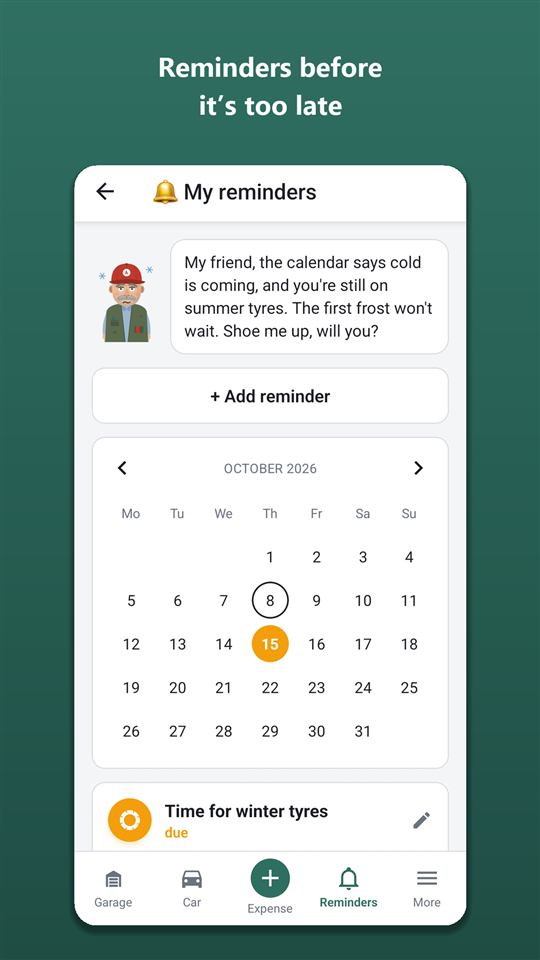
A reminder is triggered by date, by mileage or by whichever comes first. When it falls due, a push arrives — and repeats every day at the hour you chose until you tap “Done”, snooze it or turn it off.
The “Reminders” screen has a month calendar (days are marked with the colour of the most urgent reminder) and a list: “overdue” at the top, then “due”, “planned” and “snoozed”. Each one has buttons:
- “Done” — it’s done, the reminder closes;
- “Snooze” — for a week, a month or until a date;
- “Don’t remind again” — turn it off; turned-off reminders can be brought back.
For mileage-based reminders the app estimates the date from how far you’ve driven in the last 90 days: “1,200 km left · ≈ 14.11.2026”. A push also comes when the expected date is a week away — even if the kilometres haven’t been covered yet.
In Settings → “Notifications” you choose the hour and the groups: service and maintenance, weather and tyres, documents, parking and rentals, financing. A switched-off group sends no push, but its reminders stay in the list. If up to three reminders fall due at once, each comes as a separate notification; more than that — as one summary.
Your own reminder — “+ Add reminder”: for example, “Replace the wiper blades” by a date or mileage, with notice of a week, a month, 500 or 1,000 km. Reminders and push notifications are free forever.
Which reminders appear on their own
Most reminders don’t need to be created — they appear from your records:
- the mechanic’s recommendations from a workshop visit — 1,000 km or a month before they’re due;
- insurance, roadworthiness inspection, registration — a month before they expire; a new policy of the same type and country closes the reminder for the old one automatically. More on documents — on the car documents page;
- a rented parking space — monthly 5 days, yearly a month before the paid period ends;
- loan, leasing and instalment payments — ahead of the next payment on the contract schedule; more — for business, taxi and delivery;
- tyre storage — a week before the paid term ends;
- a recall, if the car is affected by a manufacturer’s recall in the EU Safety Gate database;
- “Shall we check the mileage?” — on Mondays, as long as the car’s mileage is only Orik’s estimate.
Warranties on parts and repairs, with a reminder a month or 1,000 km before they end, are in Orik Pro.
A reminder to pay a fine at the discounted rate
If a fine hasn’t been paid yet, mark it in the fine form: country, “Pay by” and, if there is one, “Discounted until” with the amount. The reminder comes 2 days before the discount ends and then every day.
For some countries the app suggests the early-payment discount: Spain — 50% within 20 days, Italy — 30% within 5 days, Russia — 25% within 30 days. These are general rules — check against the text of the notice.
Reminders for tyre changes, seasonal headlights and season prep
Set the car’s region in its details and the seasonal reminders become more accurate. All of this is free and calculated without AI.
- Tyre change. Orik looks at the 16-day forecast: cold nights on the way — a reminder about winter tyres; settled warmth — about summer ones. Winter tyre laws in the car’s country are taken into account as well: where winter tyres are compulsory from a set date, the reminder comes in advance. If the car’s region isn’t set, the reminder comes by the calendar.
- Second set. Tyres for one season only — Orik reminds you to buy the second set in good time.
- Dipped headlights in the daytime by season — where they’re needed only in certain periods: in Croatia from the autumn to the spring clock change, in Belarus during the “Attention — children!” periods (25 May — 5 June and 25 August — 5 September). Push — 2 days before the start.
- Winter and summer prep — one reminder per season; a tap opens the season’s checklist.
- Tyre pressure — every 30 days.
More on tyres and tyre sets — on the tyre sets page.
Frequently asked questions: Service schedule and car maintenance reminders
Are reminders free?
Yes, all reminders and push notifications are free forever, including the service date forecast and weather-based tyre changes — those are calculations, not AI. Orik Pro adds only recognising the schedule from a booklet (15 credits), web search (10 credits) and warranties.
Can I get reminders by email?
No, reminders come only as push notifications on your phone and are shown on the “Reminders” screen.
What if my odometer is in miles?
Choose “miles” in the car details — mileage in the schedule, service plan and visits is entered and shown in miles.
How accurate is a schedule from the web?
It’s an AI draft: Orik looks for the manufacturer’s data and doesn’t make up numbers — if he finds nothing, he says so. But check it against your service booklet; uploading its pages from photos is more reliable.
Who gets reminders for a shared car?
The owner and the car’s members — the push comes to their phones. More — shared car.
Do I have to mark every service job separately?
No. A workshop visit marked “Scheduled service” marks all the jobs of that service as done according to the schedule and sets a reminder for the next one.
Digital service book for your car
Every workshop visit and DIY repair in one book: what was replaced, at what mileage, which parts were fitted and what the mechanic advised.
Learn moreYour car’s current condition and tyre sets
How much is left on the front and rear pads, what tread your winter tyres have, where the summer set is stored — all on one screen.
Learn moreCar documents on your phone: insurance, inspection, a safe and loyalty cards
Autoracle keeps the car’s documents together with its history: insurance policies, roadworthiness inspections and registration — by country, with expiry dates and a reminder a month before they end.
Learn moreTry it with your own car
All tracking is free forever. Photo recognition and Orik the assistant — 3 days of Pro free after sign-up.