Car expense tracker: fuel, repairs and insurance — in any currency
Autoracle keeps every car expense in one place — from a refuel to a fine or a loan payment. Records are added from a photo or by hand, work offline and are converted into the car’s currency at the rate on the date of each purchase.
- Expenses fall into 10 categories: fuel, workshop, DIY maintenance, parts, documents, tolls and parking, fines, tax, financing, station shop.
- Each record is stored in the currency you paid in; in summaries, amounts are converted into the car’s currency at the rate on the date of the record. More than 150 world currencies are available.
- Fuel is logged in its own units: litres, kWh for an EV, m³ or kg for CNG; a dual-fuel car has two tanks with separate consumption.
- New expenses can be logged offline: the record and its photo join a queue and are sent automatically once you’re back online.
- Deleted records stay in the trash for 30 days, and records older than 30 days are protected from accidental deletion.
- Manual tracking of all expenses is free forever; Excel export is in Orik Pro, “Download my data” is free.
What car expenses can you log
Autoracle has 10 expense categories, each with its own form and the fields it needs. To add a record, use the “+” button on the bottom bar or “Add a record” on the dashboard.
- Fuel — refuels and charging: quantity, price, total, fuel grade, station, mileage, “full tank”.
- Workshop — a service visit: jobs from the catalogue, parts, the mechanic’s recommendations, a condition inspection.
- DIY maintenance — car wash, top-ups, repairs you do yourself; parts for the job as separate items.
- Parts — each item of the receipt separately: name, brand, part number, quantity, price.
- Documents — insurance, roadworthiness inspection, registration, with a validity date and a reminder.
- Tolls and parking — toll road, parking, ferry, tunnel or bridge, a rented parking space with a renewal reminder.
- Fines — with a reminder of the payment deadline and of the early-payment discount where there is one.
- Tax — annual (“Paid until” and a reminder 2 weeks before, or a week or a month) or one-time, paid at registration or purchase. For many countries the form shows the official names of the car taxes; you enter the amount yourself.
- Financing — loan, leasing, instalment and subscription payments (more — for business and taxi).
- Station shop — coffee, food and anything else on the road that isn’t for the car. It’s recorded separately and doesn’t count towards spending on the car, the cost per kilometre or the budget: statistics show how much goes “along the way” on the road and what that comes to per 100 km.
Income and odometer readings (“Check mileage”) are recorded separately, not as expenses. Repairs, DIY maintenance and parts have an “Upgrade / tuning” mark: such spending shows in your expenses but doesn’t inflate the cost per kilometre.
How to track car expenses in different currencies
Each expense is saved in the currency you paid in, and the car’s summaries are converted into its base currency at the rate on the date of each record. Different currencies are never added up without an exchange rate.
Example: the car is tracked in złoty, you refuelled in Germany for €70 and in Czechia for 1,500 Kč. The refuel list keeps €70 and 1,500 Kč, while the month’s spending shows both amounts in złoty — at the rate on the day of each refuel, not today’s.
- Choosing a currency — quick buttons based on your region (your country’s currency, euro, dollar, neighbours) and “Other…” with search across all currencies.
- Each car has its own base currency — one can be tracked in złoty, another in euros.
- One currency for all summaries — “Show amounts in” in Settings: the garage, dashboard, statistics and trips show everything in the chosen currency, while the records themselves don’t change.
- No exchange rate (no connection, or the rate provider doesn’t have the currency) — the amount is shown on a separate line in its own currency and isn’t mixed with the rest.
Litres, kWh, gas and two tanks: how fuel is logged
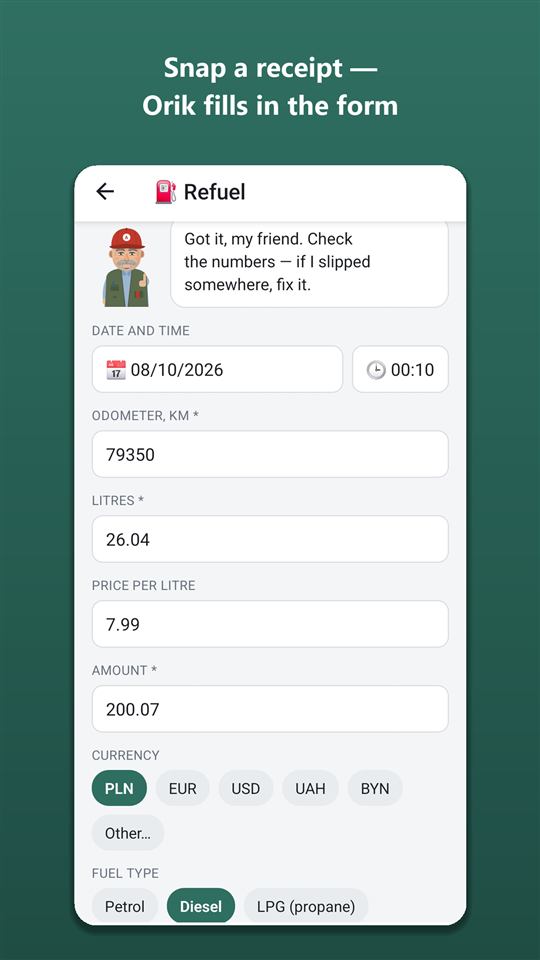
A refuel is logged in the units of your fuel: litres for petrol, diesel and LPG, kWh for an electric car, m³ or kg for CNG. Litres, price per unit and total are linked — change one and the other is recalculated.
- Two tanks. For a car with an LPG conversion, a factory “CNG + petrol” setup or a dual-fuel diesel, you specify the second fuel with its own tank. When refuelling you choose the tank, consumption is calculated for each separately, and fuel cost per kilometre is based on the money spent on both.
- AdBlue. When refuelling a diesel, the “+ AdBlue” button adds the amount and litres as a separate record — they don’t count towards fuel consumption.
- Discounts. A loyalty card or coupon goes into a separate field: the total equals what you paid, the price per litre is as shown on the pump. Statistics show “Saved with discounts”.
- Electric car. Instead of “full tank” — the charge before and after in percent, the charging type (AC or DC), and charging at home at your home tariff, including a night rate.
- Check before saving. Orik warns you if the mileage doesn’t match neighbouring records, more was filled than the tank holds, or the price is far off your usual refuels.
- Missed refuel. The “Previous refuel not recorded?” mark excludes the incomplete stretch from average consumption.
You don’t have to retype the fuel receipt — Orik reads it from a photo.
Where to see all expenses and find a record
All of a car’s expenses by date are on the “Expenses” screen (a tile in the “More” sheet): the category icon and colour, the amount and a total for the selected period. There’s no income, trips or odometer readings there — only spending.
- Filters. Period — month, quarter, year, all time or your own dates; kinds of expense — tap any categories, several at once. “Station shop” isn’t included in the total spent on the car and is shown on a separate line.
- Record card. Tapping a record in “Expenses”, refuels, statistics or search opens its card: what, when, how much, details, files and who added it. To edit, tap “Edit”.
- A visit on one line. A workshop visit and its parts are shown on one line with the document’s total; a tap expands the jobs and every part.
- Search records — the magnifier in the dashboard header: station, workshop, description, note, part (name, brand, part number), a job from a visit, document number. Search needs the internet and shows up to 100 records.
- Lists by category open from statistics for the selected period.
How to set a budget for your car
A budget is a monthly spending limit in the car’s currency — overall and, if you like, separately for fuel. The dashboard shows a “spent of budget” bar.
When the month’s spending passes 80% and 100% of the budget, Orik tells you right after you save a record — no push notifications, each threshold once a month.

Set a budget and I’ll let you know when the month starts going over. No lectures, just numbers.
How the money splits across categories and what a kilometre costs — on the cost per kilometre and statistics page.
Step by step in the help guide
Can you log expenses offline
Yes. New expenses and odometer readings are saved even without a connection: the record and its photo join a queue on the phone and are sent automatically when the connection returns, when the app starts or when you come back to it.
- While the queue isn’t empty, a status bar stays at the top. If the server rejected a record (not because of the network), the bar offers “Retry” and “Delete”.
- Offline, screens show the last loaded version, and records from the queue are already counted in spending and mileage.
- Online only — recognition from photos, editing and deleting records, income, adding a car.
You can sign out only after the queue has been sent, so that no records are lost.
What happens if you delete a record by mistake
A deleted expense, income record or trip stays in the trash for 30 days and is restored with one button; records older than 30 days can’t be deleted by accident at all.
- Trash — Settings → “Trash”: “Restore” brings the record back with all its parts, jobs and files, “Delete forever” erases it for good. The trash empties itself after 30 days.
- Protecting old records. A record older than 30 days can be deleted only while “Allow deleting old records” is on in Settings → “Security” — it stays on for 10 minutes.
- Mileage after editing. If a typo in the mileage (429,000 instead of 42,900) pushed up the car’s mileage, it is recalculated from the remaining records once you fix it.
How to export car expenses to Excel
Exporting expenses to Excel is an Orik Pro feature; a full copy of all your data (“Download my data”) is free at any time.
- Excel export (Pro): period, categories, and for parts — all, bought separately or as part of a repair; sheets — a general list, refuels, parts, workshop jobs, totals by category and month. Amounts are in the payment currency and in the car’s currency at the rate on the date; dates are real Excel dates.
- “Download my data” (free, Settings → Profile) — all your records in one Excel file.
- Moving from another app — import from Fuelio, Drivvo, aCar, Spritmonitor and others, or your own CSV or Excel spreadsheet: switching apps and selling.
In countries where AI is unavailable (for example, Belarus), Excel export is free.
Frequently asked questions: Car expense tracker: fuel, repairs and insurance — in any currency
Is car expense tracking free?
Yes, manual tracking of all 10 categories, statistics, the budget, offline use and “Download my data” are free forever. Orik Pro adds recognition from photos and Excel export.
Does the app work offline?
New expenses and odometer readings can be logged without a connection — they’re sent automatically once you’re back online. Recognition, editing and deleting records need the internet.
Can I track the car in one currency and pay in another?
Yes. A record is stored in the payment currency, and summaries are converted into the car’s currency at the rate on the date of each record.
How do I track an LPG car with two tanks?
Set the second fuel and the second tank’s size in the car details. When refuelling, choose the tank — consumption is calculated for each one separately.
Can I get a deleted record back?
Yes, it stays in the trash for 30 days (Settings → “Trash”) and is restored together with its parts and files.
Can I move my history from Fuelio or Drivvo?
Yes, via Settings → “Import from another app”. Fuelio, Drivvo, Simply Fleet, aCar, Fuel Manager, Car Expenses, Spritmonitor and your own CSV or Excel spreadsheet are supported; importing again creates no duplicates.
How much does a kilometre in your car cost
Autoracle’s statistics show not just the sum of your receipts but the cost per kilometre: driving (fuel and maintenance) separately from owning the car as a whole (plus insurance, tax, tolls).
Learn moreScan fuel receipts, work orders and car documents from a photo
With Autoracle you don’t retype receipts: photograph a fuel receipt, a workshop work order, an insurance policy or a registration document, and Orik, the AI assistant, puts the data into the form fields.
Learn moreA car for work: taxi, delivery, business and VAT
If your car earns money, you need to know not just the costs but the profit from every kilometre.
Learn moreTry it with your own car
All tracking is free forever. Photo recognition and Orik the assistant — 3 days of Pro free after sign-up.