Car documents on your phone: insurance, inspection, a safe and loyalty cards
Autoracle keeps the car’s documents together with its history: insurance policies, roadworthiness inspections and registration — by country, with expiry dates and a reminder a month before they end. In the “Garage safe” the current documents and the registration document open even without a signal, next to your personal documents, warranties and loyalty cards.
- There are three kinds of car document: insurance, inspection and registration; each has a country, a validity period, an issuer, contacts and files.
- A reminder comes a month before a document expires and repeats every day until you close it; a new document of the same kind and country closes it automatically.
- You can photograph a policy: Orik recognises the number, dates, insurer, helpline, policyholder, number plate, VIN and Green Card number (Orik Pro, 2 credits).
- The “Garage safe” copies the files of current documents and the registration document to the phone — they open at a border and offline.
- Personal documents (driving licence, international driving permit, health insurance, passport) can be kept in the cloud or only on the phone — in which case nothing reaches the server.
- Warranties on parts and work are in Orik Pro: a reminder a month or 1,000 km before they end, and the warranty is found automatically in a recognised receipt or work order.
- Loyalty cards for fuel stations, workshops, car washes and shops show the barcode at the till offline; bank cards can’t be added to the app.
How to keep your car insurance, inspection and registration
A car document is a separate record with a type (insurance, inspection or registration), a country, “Valid from / until” dates, a cost and files. Entering it by hand is free; recognising a policy from a photo is an Orik Pro feature.
Each document has its own country rather than one per car: if you drive in Poland and Belarus, the car can have two current policies — each with its own expiry date and its own reminder. The country field has quick buttons (the country of the car’s region and the country in your profile) and “Other…” with a search across all countries.
What’s saved with a document:
- issuer — insurance company, inspection station, registration authority;
- contacts — helpline, phone, email, agent; you won’t have to look for them after an accident;
- document number and cost (a free document — 0);
- files — every page of the policy, photos or PDF.
Paying a policy in instalments? Choose “Payment: In instalments”, how often and how many payments — each payment is recorded as an expense on its due date, automatically or after a reminder, without counting the full price twice.
Registration usually doesn’t expire, so its “Validity” is already set to “No expiry”: there is no renewal reminder, and the cost is counted once — in expenses and cost per km. If yours has an end date, choose “Until a date”.
On the “Car” screen, current documents sit under the car’s specifications with the days remaining: green — more than a month, orange — less than a month, red — expired. Expired documents go into a collapsed list so the history isn’t lost.
Recognising a policy costs 2 credits for one or two pages, plus 1 credit for every page over two. More on which documents Orik reads — on the filling in from photos page.
Reminders before your insurance and inspection expire
Autoracle reminds you a month before a document ends: turn on “Remind a month before it ends?” in the form. A push comes every day until you tap “Done”, snooze it or turn it off.
The handiest part is auto-closing. Bought a new policy and entered it — the reminder for the old policy of the same type and country closes by itself. The same goes for inspection and registration. Nothing has to be marked by hand.

The policy runs out in a month — I’ll tell you in advance, not on the day it’s already too late. Enter the new one and I’ll clear the old reminder myself.
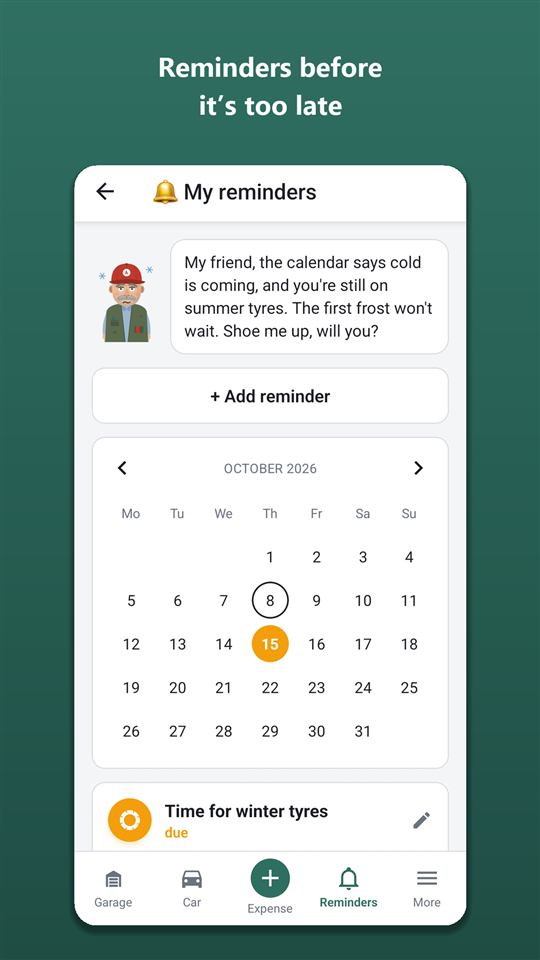
All the car’s reminders are collected in “My reminders” with a calendar; other types of reminder are on the service schedule and reminders page. In Settings you can turn off push notifications for the “Documents” group separately — the reminders still stay in the list.
Policy details: policyholder, number plate and VIN
For insurance the app also keeps the details of the policy itself: the policyholder and their address, the number plate, VIN and make of the insured car, and the Green Card number. They fill in by themselves on recognition; the form has a “Policy details” block, and everything can be corrected by hand.
If the number plate or VIN on the policy doesn’t match the car, Orik warns you and asks whether it’s the right policy. That makes it easy to spot a policy for another car attached by mistake, or a policy with a typo.
These details are visible to everyone who can see the car’s documents — just like the registration document. The policyholder can be someone other than the account owner.
The policy details come in handy at a bad moment: after an accident they’re filled into the draft European Accident Statement automatically. More — on the “Accident: what to do” and the accident statement page.
How to track an insurance claim on a policy
An insurance claim is a record linked to a specific policy: date, what happened, case number, status, the payout and your share, the repair and files. It opens from the “Car” screen: tap the policy — “+ Insurance claim”.
The status changes as the claim progresses: “Filed”, “In review”, “Paid”, “Rejected”. You record the payout and your share (excess or top-up) in one currency, and link the repair to a workshop visit in the service book — so you can see what the repair cost and how much the insurer covered.
Photos of the damage, reports, correspondence — any files can be attached to the claim. Delete the policy and its claims are deleted too.
Insurer dragging its feet? Write down the case number and status — six months on you won’t have to remember who you called and what they promised.
Car documents offline: the “Garage safe”
The “Garage safe” is one screen with all the car’s current documents and its details: document type, country, number, validity, issuer, contacts, plus make, number plate, VIN and the registration document. The files are copied to the phone, so they open at a border, when roaming and in an underground car park.
Open the safe at least once with internet — after that the copies update themselves: new documents are downloaded and outdated ones removed. Tap a file — “Open” — and it opens in a phone app (PDF viewer, gallery). Numbers and phone numbers can be selected and copied.
The safe opens from the garage, from the dashboard (the “Garage safe” tile) and from the “More” sheet. The copies on the phone are deleted with the car, on signing out and on deleting the account. The web version has no copies — files open via a link there.
Where to keep your driving licence and health insurance: in the cloud or only on the phone
At the top of the safe is “My documents”: driving licence, international driving permit, health insurance and “Other” — a passport or anything else. These are your documents, not the car’s: only you can see them; members of a shared car can’t.
For each personal document you choose where it’s kept:
- In the Autoracle cloud — it won’t be lost if you change or lose your phone;
- Only on this phone — nothing reaches the server: neither the record nor the files. But if the phone is lost, the document can’t be recovered.
Set “Valid until” and a reminder comes a month ahead. For documents kept only on the phone, the reminder is local too, from the phone.
Further down the safe are the cars’ documents: “All cars” or one selected car.
Keeping track of warranties on parts and repairs
The “Warranties” section is a simple list of what’s under warranty: what exactly, where it was bought or repaired, from what date, until what date and/or mileage, terms, a note, a photo of the warranty card. Adding warranties and getting reminders is in Orik Pro; warranties you’ve already entered are always visible, including after the subscription ends.
The reminder is on by default: a month before the end date or 1,000 km before the mileage limit — whichever comes first. For example, a battery with a 2-year warranty, or an alternator after a repair with a 12-month, 20,000 km warranty.
You don’t have to add a warranty separately. If a recognised parts receipt or workshop work order states a warranty period, the form shows a “Warranty found… — add” block with the tick already on — the warranty is saved together with the record.
In countries where AI is unavailable (for example, Belarus), warranties are free — like the other Orik Pro features that work without AI.
Fuel station and workshop loyalty cards on your phone
“Loyalty cards” is a wallet of bonus and discount cards for your car: fuel stations, workshops, tyre shops, car washes, parts, parking and more. At the till, tap the card — the barcode or QR is drawn on the screen and the brightness goes up to maximum so the scanner reads it first time. Bank cards can’t be added here.
The clever bit is under the code: “⛽ Log refuel” on a fuel station card and “🔧 Log visit” on a workshop or tyre shop card. While the cashier rings up the receipt, the record is already open for the right car — all that’s left is to photograph the receipt.
How to add a card:
- scan the barcode or QR with the camera;
- photograph the card — the app tries to read the code from the photo, and the first photo (the front) becomes the card’s picture in the list;
- type in the number by hand and choose the format: standard barcode, EAN-13, QR or no code.
A card can be linked to one car or left for all of them. Lots of cards — filter by type and search by name. The code is drawn on the phone itself, so the cards work offline.
Frequently asked questions: Car documents on your phone: insurance, inspection, a safe and loyalty cards
Is it free?
Yes: car documents, expiry reminders, insurance claims, the “Garage safe”, personal documents and loyalty cards are free forever. Orik Pro adds recognising a policy from a photo (2 credits) and adding warranties with reminders.
Will the documents open offline?
Yes, in the “Garage safe”: the files of current documents and the registration document are copied to the phone. You just need to open the safe once with internet. Loyalty cards work offline too. Editing documents is online only.
Can I keep several policies for different countries?
Yes. Each document has its own country, its own validity and its own reminder. A new document closes the reminder only for the old document of the same type and country.
Who can see my driving licence and passport?
Only you. Even members of a shared car can’t see the personal documents in “My documents”. And if you choose “Only on this phone”, the document never reaches the server at all.
What happens to warranties after the subscription ends?
They stay and remain visible, and you can export them via “Download my data”. Adding new warranties and getting reminders for them requires Orik Pro.
Can I add a bank card?
No. “Loyalty cards” are only for loyalty cards: fuel stations, workshops, car washes, parts shops, parking. The app doesn’t store payment details.
Had a car accident? What to do — step by step, by the country’s rules
Autoracle’s “Accident: what to do” screen walks you through the steps at a moment when it’s hard to think straight: where you are, whom to call, how to make the scene safe, what to photograph, which details to take from the other driver and how to tell your insurer.
Learn moreService schedule and car maintenance reminders
Autoracle remembers for you when to change the oil, the timing belt and the brake fluid, when the insurance runs out and when it’s time to change tyres.
Learn moreScan fuel receipts, work orders and car documents from a photo
With Autoracle you don’t retype receipts: photograph a fuel receipt, a workshop work order, an insurance policy or a registration document, and Orik, the AI assistant, puts the data into the form fields.
Learn moreTry it with your own car
All tracking is free forever. Photo recognition and Orik the assistant — 3 days of Pro free after sign-up.