Your car’s current condition and tyre sets
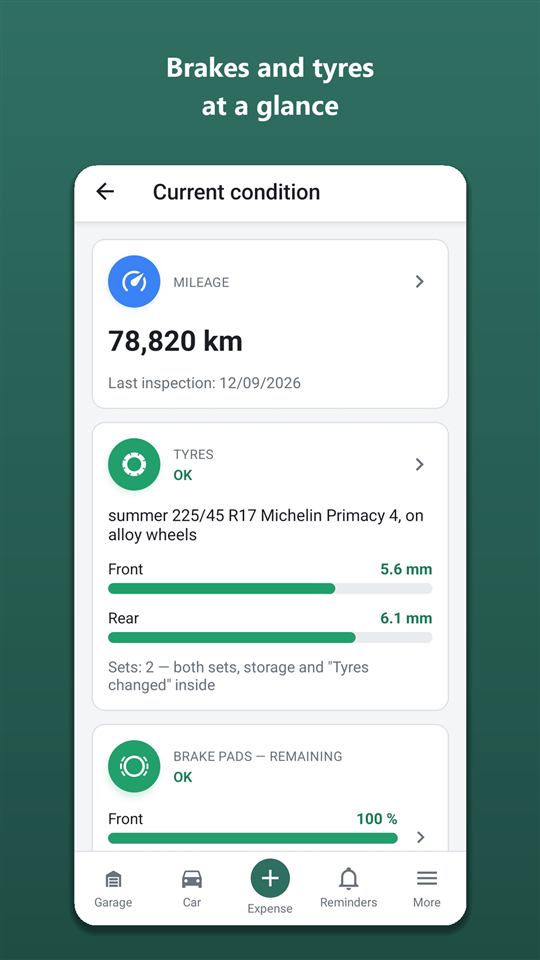
How much is left on the front and rear pads, what tread your winter tyres have, where the summer set is stored — all on one screen. The data updates itself from workshop visits, and you can add it by hand at any time, with photos.
- The “Current condition” screen shows mileage, tyres, pads, discs, radiator and bodywork; pads and discs are shown separately for the front and rear axle.
- The card colour follows the worst axle: green — 50% of life or more, orange — 20–50%, red — under 20%, grey — no data.
- Replacing pads, discs or the radiator on a work order sets the part to new automatically: 100% remaining, radiator clogging 0%.
- The app holds up to two tyre sets: season, size (including different sizes per axle), brand, rims, studs, storage location, tread per axle.
- Tyre age is worked out from the 4 DOT digits on the sidewall: from 6 years Orik suggests an inspection, from 10 — replacement.
- The tyre change reminder is based on the 16-day weather forecast for the car’s region and on the country’s winter tyre laws.
- Every 30 days Orik reminds you to check the tyre pressure.
How to keep track of brake pad, disc and tyre wear
Open “Current condition” from the dashboard: there are cards for mileage, tyres, pads, discs, radiator and bodywork. The colour of the circle shows straight away what needs attention — the screen is free and opens offline.
Each item keeps its own value:
- pads and discs — remaining life in percent, separately front and rear (100% — new);
- tyre tread — in millimetres, for the front and rear axle;
- radiator — clogging in percent (0% — clean);
- bodywork — notes and photos.
The colour thresholds are the same for every percentage item: 50% or more — “fine”, 20–50% — “replace soon”, under 20% — “replace now”. The card colour is set by the worst axle: if the front pads are at 15% and the rear at 70%, the card is red.

Pads at 20% don’t mean “I’ll drive on a bit” — they mean “time to book in”. Brakes are not the place to save money.
How the condition updates after a workshop visit
The workshop visit form has a “Condition check” block: the mechanic tells you how much is left on the pads, the tread depth, the radiator’s state — you enter it, and “Current condition” updates itself. Entering it by hand is free; recognising a work order costs 5 Orik Pro credits.
The app understands part replacements without extra taps:
- the job “Front brake pad replacement” or pads in the parts list — the front pads become 100%, with a note “↺ by job …” next to them;
- radiator replacement or cleaning — clogging 0%;
- discs were replaced but there’s no data on the pads of the same axle — the app doesn’t guess, it offers a button “Pads replaced too → 100%”.
If the axle can’t be told from the part name, the app takes it from the matching part of the same axle, and if it’s still unclear, it marks nothing. More about the visit itself — on the digital service book page.
An old work order entered retrospectively won’t overwrite a more recent inspection: “now” shows the latest measurement by date.
How to add an inspection by hand and view the measurement history
Tap any card to open the measurement history of that item: date, value, mileage, where the record came from (a workshop visit or by hand) and an attachment icon. “+ New record” adds a measurement: axle, value, date, mileage, note, photos and files.
You can attach photos to every inspection item — pads, discs, tyres, radiator, bodywork.
Manual inspections also appear in the mileage history — as one line, “Manual inspection · Inspection items: N”, expanding on a tap. Editing and deleting old measurements needs the internet.
Tyre sets: summer and winter, storage, age by DOT
In “Tyre sets” you can add up to two sets. Each has a season (summer, winter, all-season), winter tyres have a “Studded” mark, plus size, brand and model, whether they’re on rims and which ones, tread per axle, photos and files.
Staggered tyres (different front and rear) are supported: the size and model are set separately for each axle.
Tyre swap — at a garage: a visit with a tyre job (“Seasonal tyre change”, “Seasonal wheel swap”, “Fitting new tyres”) gets a “Tyres” block: whether the set on the car was swapped and the tread of the removed set. Yourself — the “Swapped myself” button: date, mileage, which set went on, tread of both. No expense, but the set’s history has the entry.
Tyre storage is a separate record of the set: where it is (garage, home, friends), from and until when, tread at drop-off, photos and files. A cost only if storage is paid — then it counts towards spending and the cost per kilometre, but not the service book or the QR history page. A reminder comes a week before the end, and when the set is back on the car the storage closes by itself.
If there’s only one set and it’s seasonal, Orik reminds you to buy the second one in good time: winter — in February–March, summer — in August and early September.
Tyre fitting and storage at one place on one day show in Expenses as one row: two records inside, each with its own document. A visit with only tyre jobs (swap, balancing) does not go into the service book — the book and the QR page show a short “Tyres” block instead: sets, year of manufacture, tread, last swap.
A tyre storage acceptance form can be recognised (Orik Pro, as a document) — in the storage form or straight from “Quick expense”: Orik fills in the date, period, place, cost and tread, and offers to record the fitting from the same form as a garage visit. A tyre fitting invoice or work order is recognised as a normal garage visit.
The set card shows its history: when it was fitted, removed, put into storage and taken back, tread measurements and how many kilometres were driven on this set.
Orik doesn’t read a photo of the tyre sidewall itself: dirt and a dim garage cause errors. So — documents only.
Tyre age by DOT. A tyre’s age is encoded in the 4 digits after the letters DOT on the sidewall: the first two are the week, the last two the year. “2319” means week 23 of 2019.
Enter these digits in the set’s card (the ⓘ icon next to the field shows where to find them). For tyres 6 years or older Orik suggests having them checked by a mechanic, from 10 — replacing them. The warning appears in “Orik noticed” on the dashboard and in the pre-trip checklist.
Rubber ages even when the tread looks new — have a look at the sidewall at least once.
When to change tyres: by the weather and by law
Set the region in the car details and add both sets — Orik will remind you to change tyres on his own. He looks at the 16-day weather forecast: steady cold on the way — a reminder about winter tyres; settled warmth — about summer ones.
Winter tyre laws of the region’s country are taken into account too. Where winter tyres are compulsory from a set date (for example, in Belarus, Latvia and Estonia from 1 December, in Lithuania from 10 November), the reminder comes 14 days before that date. Where they’re required during a period in wintry conditions (Austria, Czechia, Finland, Sweden and others), that’s taken into account as well; summer tyres — not before the legal date.
Studs aren’t allowed everywhere and at all times: in the pre-trip checklist Orik checks a studded winter set against the rules of the countries on the route — more on the trips and pre-trip checklist page.
Once you’ve changed tyres, the reminder closes itself. How all the reminders work — on the maintenance schedule and reminders page.
Tyre pressure and getting the car ready for the season
Every 30 days Orik sends one reminder to check your tyre pressure: under-inflated tyres increase fuel consumption, wear and braking distance. The reminder closes itself after a week; “Don’t remind again” switches these reminders off for good.
Before each season there’s one more: “get the car ready for winter” or “for summer”. A tap opens the season’s checklist — from the “Winter prep” or “Summer prep” template — with a note on every item about what to check and how. Tick the items: the ticks are visible to all members of the car, and a completed checklist is saved in the service book.
Frequently asked questions: Your car’s current condition and tyre sets
Do I need to measure the pads myself?
No. Usually the mechanic tells you what’s left during a workshop visit — you enter it in the inspection, and everything updates. You add a measurement by hand if you checked yourself or had a service without a work order.
Is it free?
Yes: the condition screen, measurement history, tyre sets, storage, DOT and reminders are free forever. Orik Pro adds only recognition of documents from photos.
Does it work offline?
You can view the condition offline — from a saved copy. New measurements, editing tyre sets and recognition need the internet.
Why didn’t the tyre change reminder arrive?
The car’s region must be set in its details, and you need a second set for the right season. Without a region the forecast isn’t checked — only the calendar works.
Can I add three tyre sets?
No, the app holds up to two sets per car: one on the car and one in storage.
Can a buyer see the car’s condition?
The condition summary is shown on the QR sticker history page and in the PDF extract — see digital service book. Inspection photos aren’t included.
Digital service book for your car
Every workshop visit and DIY repair in one book: what was replaced, at what mileage, which parts were fitted and what the mechanic advised.
Learn moreService schedule and car maintenance reminders
Autoracle remembers for you when to change the oil, the timing belt and the brake fluid, when the insurance runs out and when it’s time to change tyres.
Learn moreScan fuel receipts, work orders and car documents from a photo
With Autoracle you don’t retype receipts: photograph a fuel receipt, a workshop work order, an insurance policy or a registration document, and Orik, the AI assistant, puts the data into the form fields.
Learn moreTry it with your own car
All tracking is free forever. Photo recognition and Orik the assistant — 3 days of Pro free after sign-up.