Shared car: joint expense tracking for the family and a link for your mechanic
Several people can run one car in Autoracle: each logs their own refuels and visits, while statistics, reminders and the service book are shared. Your mechanic needs neither the app nor an account: they open a link and add a visit, which reaches the service book only after you confirm it.
- Types of access to a car: owner, member (sees everything and adds records) and viewer (sees everything, changes nothing).
- An invitation is a code like XXXX-XXXX-XXXX or a QR; it’s valid for 7 days and works for one person; it can also be sent by email.
- For free, a car is run by the owner and one more person; with Orik Pro on the owner’s account — no limit.
- A “Private record” in a shared car is visible only to its author and the owner; for other records you can see who added them.
- The mechanic link is valid for 1 day, a week, a month or until revoked; the mechanic doesn’t see the prices of past visits.
- A visit or inspection from the mechanic reaches the car’s data only after the owner taps “Accept”; recognising a work order by the mechanic is paid with the owner’s credits.
- Via the QR sticker on the car you can only request access: no more than 5 requests a day, and the name and phone number are deleted 30 days after the answer.
How to track one car as a couple or the whole family
The owner invites people to the car, and it appears in their garage marked “👥 Shared”. Everyone logs what they did themselves, while spending, cost per kilometre, mileage, reminders and the service book are based on all the records together.
Typical cases:
- a family — two people use the car, and whoever is driving fills up;
- a second driver — husband and wife, parents and grown-up children;
- the one who pays — someone covers the costs but doesn’t drive and wants to see where the money goes;
- an accountant — the car is registered to a company, and the accountant needs the records and files.

One car, several drivers. Invite your people: I’ll log everything and won’t mix anything up.
Push reminders go to both the owner and the car’s members — for example, about a service or insurance running out.
Member or viewer: which access to give
Autoracle has three types of access to a car. Choose according to what the person needs to do.
- Owner — whoever added the car. Invites and removes people, changes their access, sees all records, including other people’s private ones. Only the owner can delete the car.
- Member — sees everything and adds their own records: refuels, visits, trips, documents. Can edit the car details. Suits a family and a second driver.
- Viewer — sees everything but changes nothing. Their record buttons are inactive, and a bar above the bottom panel says “You’re a viewer of this car”. Suits an accountant and someone who only pays.
Access can be given indefinitely or until a set date. The owner can switch a person with “Make viewer” / “Make member” or remove them at any time. A member can leave on their own with “Leave this car”.
A record can be edited and deleted by its author or the owner. A member opens someone else’s record for viewing only.
How to invite someone to the car: code, QR or email
The owner creates an invitation in “Members”: chooses the type of access and its duration, and gets a code like XXXX-XXXX-XXXX together with a QR. The code is single-use and valid for 7 days.
How to pass on the code:
- in person — the other person opens “More” → “Accept invitation” and scans the QR on your screen;
- by messenger — the “Send the code” button;
- by email — enter the email address when creating the invitation. If the person doesn’t have an account yet, one is created: on the sign-in screen they tap “I have an invitation”, enter the email, the code from the email and a new password — and the car appears by itself.
An unused invitation can be revoked. The database stores only a fingerprint of the code, not the code itself, so it can’t be shown again — it’s easier to create a new one.
Private records and who added what
The forms of a shared car have a “Private record” switch. Such a record is visible only to its author and the owner — for example, a car wash you paid for yourself and don’t want to show the others. Parts of a visit inherit this mark.
For other records you can see who added them: “👤 Anna” or “👤 you” — in the refuel list, the expense list, the mileage history, the service book and in the form itself. No guessing who put in 60 litres on Thursday.
You can’t hide records by category — only with the “Private” mark. Everyone who runs the car sees the overall picture: statistics, cost per kilometre, spending by category. More on the tracking itself — on the car expense tracking page.
How many people you can add for free
For free, a car is run by the owner and one more person. If the owner has Orik Pro (€4.99 per month or €29.99 per year; in Poland 18.99 / 119.99 zł), the car can have as many people as you like.
With Orik Pro on the owner’s account, members can recognise documents for that car using the owner’s credits: fuel receipt — 1 credit, document — 2, work order — 5. The members themselves don’t need a subscription for this.
In countries where AI is unavailable (Belarus, Russia and others), an unlimited shared car is free — like everything in Orik Pro that works without AI.
Mechanic link: a visit in your service book without the app
The mechanic link lets a workshop record a visit in your service book without setting up an account for them. The mechanic points a phone camera at the QR or opens the link and sees the car and the visit form in the browser on autoracle.app.
What the mechanic sees:
- the car’s specifications;
- the service history — what was done, when and at what mileage, which parts were fitted, without the prices of past visits;
- the current condition: pads, discs, tyres, radiator.
What they can do: add a workshop visit using the app’s template (jobs and parts with their own prices) or a condition inspection. They don’t edit or delete earlier records. They can photograph the work order and recognise it into the form — the credits are then taken from the car owner.
You choose the duration when creating it: 1 day, a week, a month or until revoked. You can send the link to the mechanic by email or show the QR. Revoke it any time in the list of active links.
The link lives in “Share history” (a button in “Members” takes you there). It’s free; without Orik Pro the mechanic fills in the visit by hand.
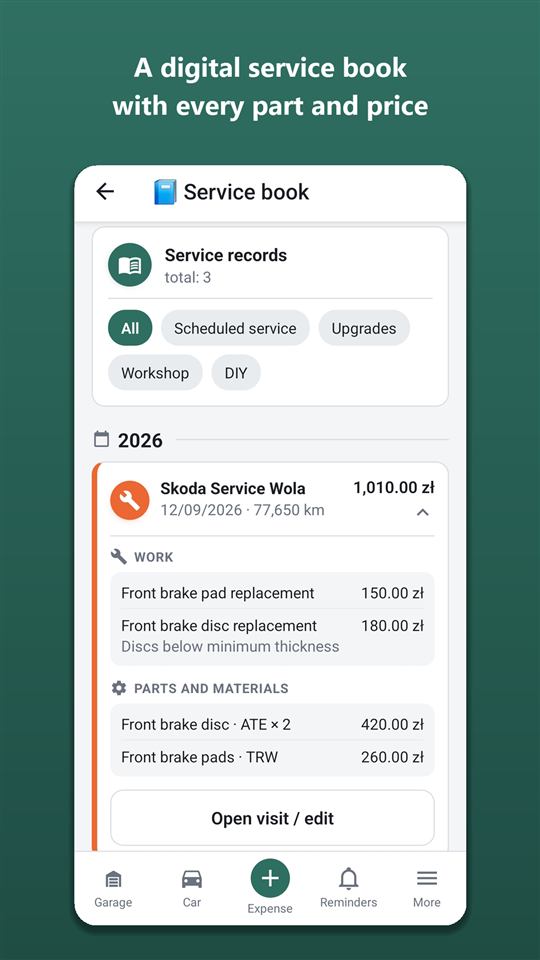
How to confirm a visit sent by your mechanic
Everything the mechanic sends arrives first as a proposal. You get a push, and a “From the mechanic” banner appears on the dashboard. Nothing gets into the car without your confirmation.
- Visit — “Review and save” opens the usual workshop visit form, already filled in by the mechanic. Correct whatever you need and save — the visit appears in the service book, and the mechanic’s recommendations become reminders.
- Inspection — “Accept” records it in “Current condition”.
- Don’t agree — “Reject”.
The mechanic sent something over. Check that it’s right — without your “yes” I won’t record anything.
Why it works this way: a link is a key that can be forwarded. The owner’s confirmation protects the book from mistakes and other people’s entries. About the book itself — on the digital service book page, about the condition of parts — current condition and tyres.
Requesting access via the QR sticker on the car
You can put a QR code sticker on the car: anyone who scans it sees the service history without prices. Nothing can be recorded through the sticker — only “Request access” can be tapped.
The person chooses “Mechanic / workshop” or “Buyer” and enters a name and phone number. The owner gets a push and decides: “For 1 day”, “For a week” or “Decline”. Once approved, a mechanic gets the visit form in the same browser — the entries still come for confirmation. A buyer sees the history even if it’s hidden.
No more than 5 requests a day per car; the name and phone number are deleted 30 days after the answer. Don’t want requests — switch them off. More on the sticker and what it shows — on the service book and “Share history” page.
Frequently asked questions: Shared car: joint expense tracking for the family and a link for your mechanic
Does the other person need their own account?
Yes, a member or viewer needs their own Autoracle account — it’s free. If you invite by email, the account is created automatically. A mechanic using the link needs neither an account nor the app.
Is it free?
The owner plus one more person — free forever. More people — with Orik Pro on the owner’s account. The mechanic link and access requests via QR are free.
Will a member see my private spending?
No, if you marked the record as “Private”: only its author and the owner can see it. The other records of a shared car are visible to all members and viewers.
Will the mechanic see what I paid at other workshops?
No. The mechanic sees the service history without the prices of past visits, plus the car’s specifications and condition. They enter prices only for their own visit.
Can the mechanic mess up my records?
No. They don’t edit or delete earlier records, and their visit and inspection reach the car only after you tap “Accept”. The link can be revoked at any time.
Who pays when the mechanic recognises a work order?
The car owner — with their Orik Pro credits (a work order is 5 credits). If there are no credits, the mechanic fills in the visit by hand.
How do I remove someone from the car?
In “Members”, tap “Remove” next to the person. You can also make them a viewer — then they’ll only be able to look. A member can leave on their own with “Leave this car”.
Digital service book for your car
Every workshop visit and DIY repair in one book: what was replaced, at what mileage, which parts were fitted and what the mechanic advised.
Learn moreCar expense tracker: fuel, repairs and insurance — in any currency
Autoracle keeps every car expense in one place — from a refuel to a fine or a loan payment.
Learn moreSwitching from another app and selling your car
Years of records don’t have to be left behind: Autoracle moves fill-ups, expenses and visits over from popular apps and from an ordinary Excel or CSV spreadsheet.
Learn moreTry it with your own car
All tracking is free forever. Photo recognition and Orik the assistant — 3 days of Pro free after sign-up.